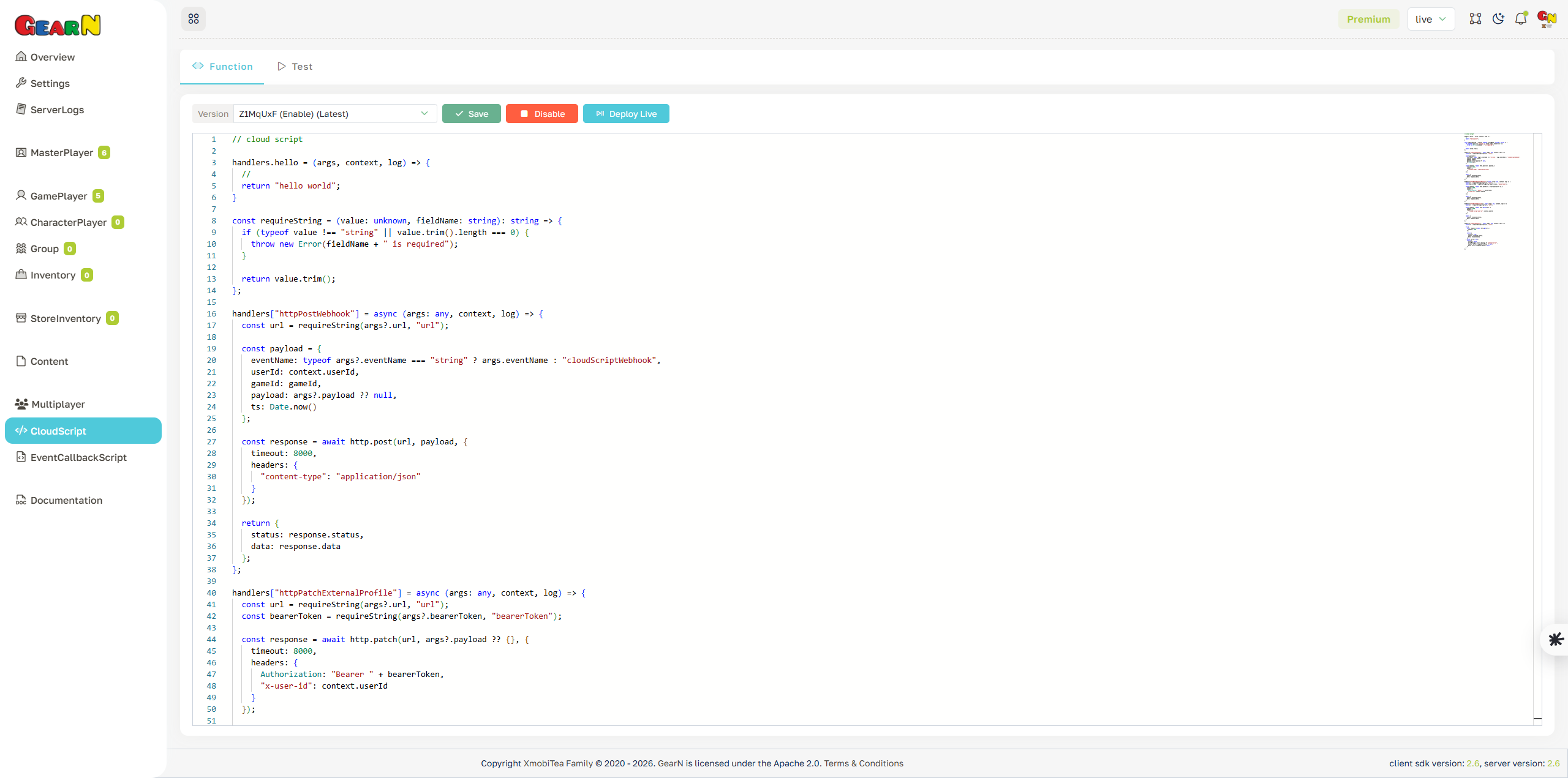
Cloud Script Function
Cloud Script Function stores versioned server-side script bundles. Each bundle registers one or more named handlers, and Execute/Test runs the handler selected by function name.
- Script bundle: Paste handler code that is injected into the server CloudScript template.
- Handler registry: Register callable functions with
handlers["functionName"]. - Version control: Use
canExecutefor runtime availability andisLivefor the default version. - Server helpers: Use
admin,database,http,socket,mail, andpushNotification.
How CloudScript Runs
The dashboard does not save a complete TypeScript file. It saves only the script body. The server injects that body into the CloudScript template after runtime objects have already been created.
| Rule | What To Do |
|---|---|
| Register handlers | Every callable function must be assigned to handlers["functionName"]. The name must be 3 to 30 characters. |
| Do not import SDK manually | The runtime template already imports GearN SDK types, MongoDB, Axios, and CloudScript helpers. |
Do not write GNNetwork | The server rejects submitted script when the literal text GNNetwork appears anywhere in it. Use admin instead. |
| Use JSON-safe logs | Call log(value) only with serializable values. Runtime stores logs with JSON.stringify. |
| Return supported values | Return void, null, boolean, number, string, plain object, array, GNHashtable, or GNArray. |
Minimal Script
Paste this into Cloud Script Function, save it with canExecute = true, then run pingCloudScript from Cloud Script Test.
handlers["pingCloudScript"] = async (args: any, context, log) => {
    const message = typeof args?.message === "string" && args.message.length > 0 ? args.message : "pong";

    log({
        action: "pingCloudScript",
        userId: context.userId,
        message: message
    });

    return {
        ok: true,
        gameId: gameId,
        userId: context.userId,
        customTags: context.customTags,
        message: message
    };
};
Handler Contract
| Parameter | Meaning |
|---|---|
args | Data from functionParameters. Treat it as untrusted input and validate fields before using them. |
context.userId | User id selected by the execute request. Client calls use the authenticated user; server/admin calls require an explicit 10-character user id. |
context.customTags | Optional metadata passed outside functionParameters. Use it for tracing, source labels, or request tags. |
log | Function-local logger. Output is returned in functionLogs and stored in CloudScript execution logs. |
return | The value returned to caller as functionResult when status is Ok. |
Version Rules
- Version length: Execute accepts a 7-character version when version is provided.
- canExecute: The version must be executable. If this is false, the worker is not loaded for execution.
- isLive: The live version is used when Execute/Test does not provide a version.
- Safe release: Save new version with
canExecute = trueandisLive = false, test by explicit version, then edit it to live.
version does not mean latest created version. It means the current live version.Runtime Objects
| Object | Use It For | Common Methods Or Types |
|---|---|---|
gameId | Current game id from the selected environment. | Use in database namespaces and response payloads. |
admin | Calling GearN privileged APIs through a CloudScript-safe wrapper. | admin.gamePlayer, admin.masterPlayer, admin.dashboard, admin.cloudScript |
database | Reading and writing GearN MongoDB data. | runtimeGameCollection, loadGamePlayerAsync, insertGamePlayerStatisticsLogAsync |
http | Calling external REST APIs or webhooks. | get, post, put, patch, delete |
socket | Sending realtime events to connected players or rooms. | sendEventTo, sendEventToMoreUser, sendEventToRoom |
mail | Sending transactional HTML email through the server mail bridge. | send, sendToMore |
pushNotification | Sending mobile push notification or managing topics. | send, sendToMore, sendToTopic, subscribeToTopic |
| SDK types | Building GearN payloads and operation events. | GNHashtable, GNArray, OperationEvent, OwnerType, model namespaces |
Use Database For Internal Data
requireString.Use database when the script owns internal GearN data or custom game data. Prefer game-scoped collections for game-specific custom records.
const requireString = (value: unknown, fieldName: string): string => {
    if (typeof value !== "string" || value.trim().length === 0) {
        throw new Error(fieldName + " is required");
    }

    return value.trim();
};

handlers["saveCloudScriptSample"] = async (args: any, context, log) => {
    const key = requireString(args?.key, "key");
    const value = args?.value ?? null;
    const sampleCollection = database.runtimeGameCollection("CloudScript.Sample", gameId);

    await sampleCollection.updateOne(
        { key: key },
        {
            $set: {
                key: key,
                value: value,
                updatedByUserId: context.userId,
                tsUpdate: Date.now()
            }
        },
        { upsert: true }
    );

    const savedDocument = await sampleCollection.findOne(
        { key: key },
        { projection: { _id: 0 } }
    );

    return {
        gameId: gameId,
        savedDocument: savedDocument
    };
};
Use Admin For Existing GearN APIs
Use admin when GearN already has a typed API for the job. Always check response.hasReturnCodeError() before trusting response data.
const requireString = (value: unknown, fieldName: string): string => {
    if (typeof value !== "string" || value.trim().length === 0) {
        throw new Error(fieldName + " is required");
    }

    return value.trim();
};

handlers["adminGetPlayerDisplayName"] = async (args: any, context, log) => {
    const targetUserId = requireString(args?.userId, "userId");

    const response = await admin.gamePlayer.getDisplayNameAsync({
        userId: targetUserId
    });

    if (response.hasReturnCodeError()) {
        throw new Error(response.toString());
    }

    return {
        userId: targetUserId,
        errorCode: response.errorCode,
        responseData: response.responseData
    };
};admin.dashboard API requires a secret, pass it from a controlled caller or another secure source.Call External Services
Use http for external REST APIs. Set a timeout and return only the fields the caller needs.
const requireString = (value: unknown, fieldName: string): string => {
    if (typeof value !== "string" || value.trim().length === 0) {
        throw new Error(fieldName + " is required");
    }

    return value.trim();
};

handlers["sendCloudScriptWebhook"] = async (args: any, context, log) => {
    const url = requireString(args?.url, "url");

    const response = await http.post(
        url,
        {
            eventName: "cloudScriptWebhook",
            gameId: gameId,
            userId: context.userId,
            payload: args?.payload ?? null,
            ts: Date.now()
        },
        {
            timeout: 8000,
            headers: {
                "content-type": "application/json"
            }
        }
    );

    return {
        status: response.status,
        data: response.data
    };
};
Notify Players
Use socket for online realtime delivery, mail for email, and pushNotification for mobile notification. Keep payloads small and do not log private tokens.
const requireString = (value: unknown, fieldName: string): string => {
    if (typeof value !== "string" || value.trim().length === 0) {
        throw new Error(fieldName + " is required");
    }

    return value.trim();
};

const createCloudScriptEvent = (eventName: string, payload: { [key: string]: any }) => {
    return new OperationEvent(
        eventName,
        GNHashtable.builder().addAll(payload).build()
    );
};

handlers["notifyPlayerFromCloudScript"] = async (args: any, context, log) => {
    const targetUserId = typeof args?.userId === "string" && args.userId.length > 0 ? args.userId : context.userId;
    const message = typeof args?.message === "string" && args.message.length > 0 ? args.message : "CloudScript notification";

    await socket.sendEventTo(
        targetUserId,
        createCloudScriptEvent("cloudScriptNotification", {
            message: message,
            sourceUserId: context.userId,
            ts: Date.now()
        })
    );

    if (typeof args?.email === "string" && args.email.length > 0) {
        await mail.send(args.email, "CloudScript notification", "<p>" + message + "</p>");
    }

    if (typeof args?.pushToken === "string" && args.pushToken.length > 0) {
        await pushNotification.send(args.pushToken, "CloudScript", message, 1, "default", "ic_notification", {
            source: "cloudScript",
            userId: targetUserId
        });
    }

    return {
        notified: true,
        userId: targetUserId
    };
};
How To Test
- Open Dashboard / Cloud Script / Function and create a new script version.
- Set
canExecute = trueso the server can load the worker. - Keep
isLive = falsewhile testing a new version. - Open Dashboard / Cloud Script / Test.
- Enter
functionName,userId, the exact 7-characterversion, and JSONfunctionParameters. - Review
status,functionResult,functionLogs,executionTimeInMs, andmemoryUsedInBytes.
Sample Test Parameters
{
    "message": "hello from dashboard",
    "key": "daily-reward",
    "value": {
        "coins": 100
    }
}
Execute Status
| Status | Meaning |
|---|---|
1 Ok | The handler ran successfully and returned a supported value. |
2 Exception | The handler threw an error or returned an unsupported value. |
3 FunctionNameNotFound | The selected version does not register handlers["functionName"]. |
4 VersionInvalid | The version does not exist, is not executable, or no live version is available when version is omitted. |
5 Timeout | The script exceeded the configured execute timeout. The current server default is 15 seconds. |
Common Mistakes
- Saving helper functions but forgetting to assign
handlers["functionName"]. - Calling Test without version and expecting the latest draft to run.
- Setting
canExecute = falseand then wondering why execution returns version error. - Returning class instances, functions, Date objects, or large SDK responses instead of plain JSON.
- Logging secrets, auth tokens, push tokens, or full external HTTP responses.
- Using admin APIs as a shortcut when raw database or a narrower helper is the correct abstraction.